Zoom bei Mausbewegung, Bild dient nur als Referenz.


Technische Daten
Li-Ion-Laptop-Akkus mit 7,2 V und 7,4 V werden häufig verwendet.
Li-Ion-Laptop-Akkus mit 10,8 V und 11,1 V werden häufig verwendet.
Li-Ion-Laptop-Akkus mit 14,4 V und 14,8 V werden häufig verwendet.
7,2 V (= 7,4 V), 10,8 V (= 11,1 V), 14,4 V (= 14,8 V) Batterien haben unterschiedliche Spannungen und sind nicht kompatibel. Bitte wählen Sie die richtige Batterie (Spannung).
Mit diesem Akku erwerben Sie ein Qualitätsprodukt, welches ausschließlich mit hochwertigen Zellen namhafter Hersteller wie Samsung, Sanyo und Panasonic bestückt ist. Unsere Akkus werden nach den höchsten Qualitätsstandards hergestellt und zeichnen sich durch eine hohe Langlebigkeit aus. Des Weiteren besitzen unsere Akkus eine hohe Zyklenfestigkeit, welche eine hohe Anzahl an Lade- und Entladezyklen gewährleistet.
Merkmale unserer Akkus:
- problemloses Laden mit dem original oder baugleichen Ladegerät / Netzteil
- Überhitzungs-, Überlade- und Kurzschlussschutz wie im Originalakku
- kein Memoryeffekt durch Hochleistungszellen
- 100 % Passgenauigkeit zum Originalakku
- geringe Selbstentladung
Tips
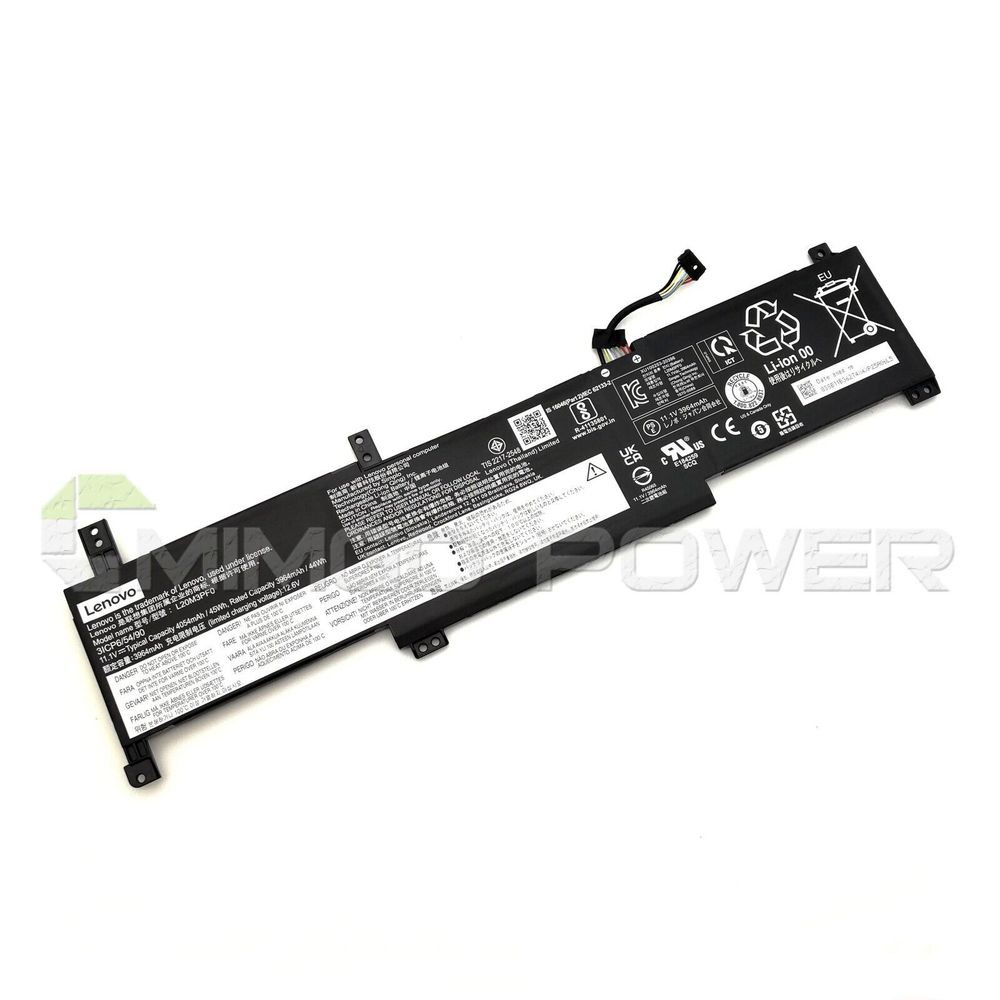
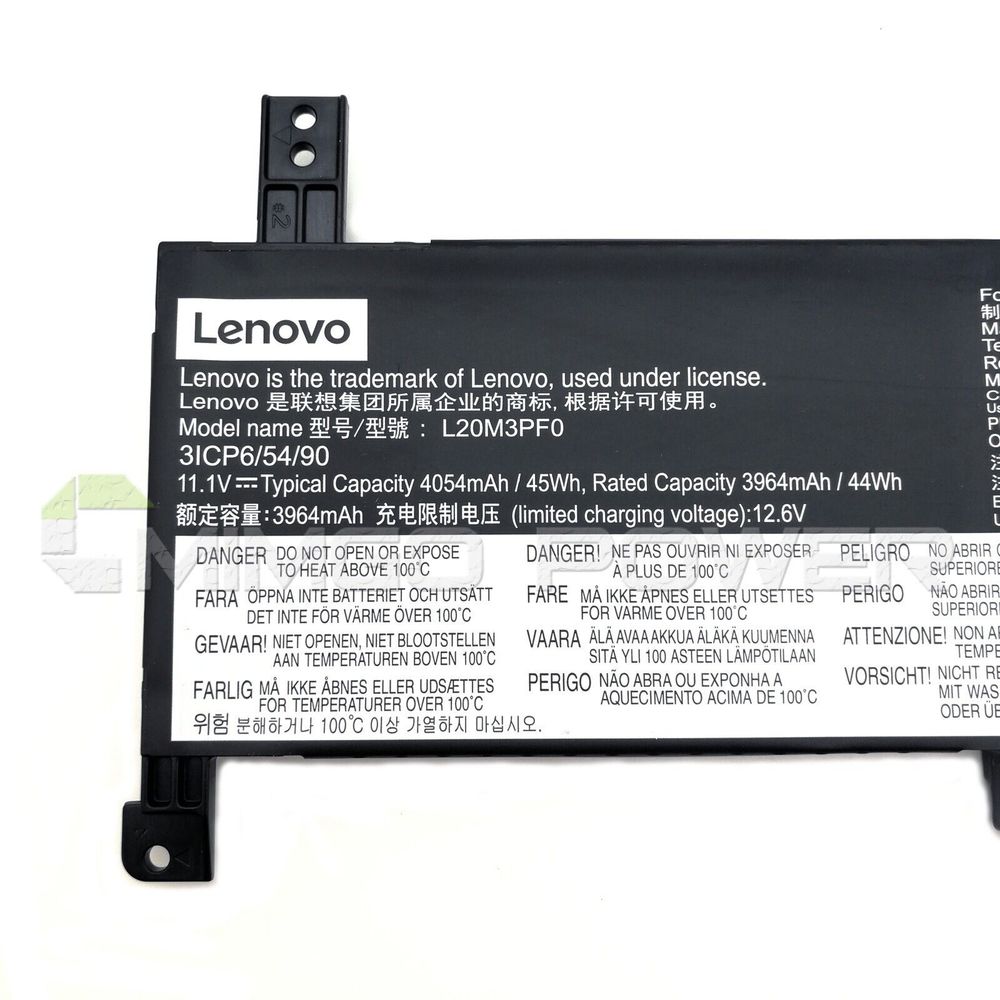
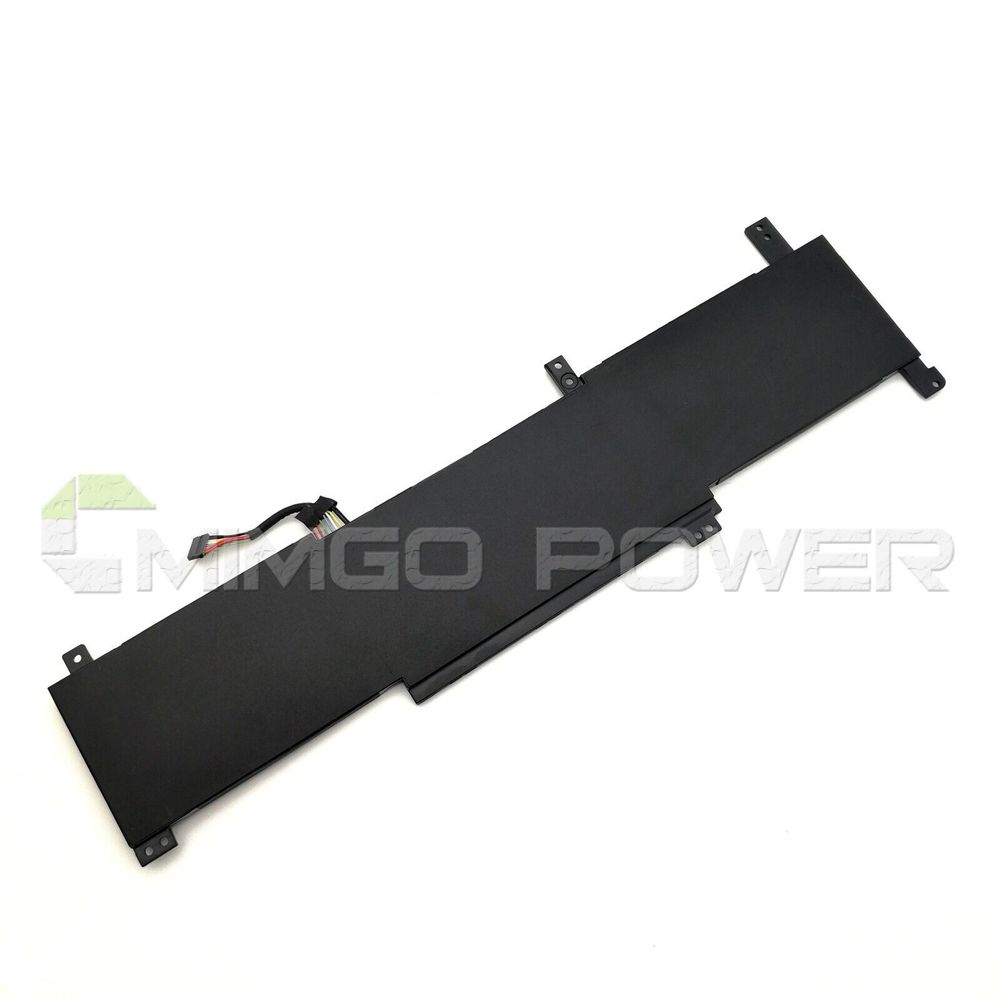
Schauen Sie sich vor dem Kauf am besten unseren Akku aus den obigen Bildern an und prüfen Sie, ob er mit Ihrem Original übereinstimmt. Bitte stellen Sie sicher, dass Sie den richtigen Akku auswählen, um eine Fehlbestellung zu vermeiden.
Bitte bestätigen Sie, dass Ihr Maschinenmodell, die Spannung oder die Teilenummer in unserer Beschreibung kompatibel sind. Außerdem können Sie einen Vergleich zwischen Ihrer Originalbatterie und unserem Artikel anstellen. Bei gleichem Aussehen (insbesondere der Anschlussposition) und gleicher Batteriespannung ist dies kein Problem Zum Austausch mit Ihrer Maschine, solange Ihr Modell oder Ihre Teilenummer in unserer Beschreibung kompatibel ist.
 Produkthandbuch - Bedienungsanleitung
Kompatible LENOVO Teilenummer
Bitte verwenden Sie die Tastenkombination [Strg + F], um unten Teilenummern / Modellnummern schnell zu finden.
LENOVO
- 5B11B36275
- L20C3PF0
- L20L3PF0
- L20M3PF0
- SSB11B36277
Kompatible LENOVO Laptop Modelle
LENOVO
- IdeaPad 3 14ITL6 82H7002EMX
- IdeaPad 3 14ITL6 82H7003UVN
- IdeaPad 3 14ITL6 82H70047PH
- IdeaPad 3 14ITL6 82H70048PH
- IdeaPad 3 14ITL6 82H7004NRK
- IdeaPad 3 14ITL6 82H7009DHH
- IdeaPad 3 14ITL6 82H7009JSB
- IdeaPad 3 14ITL6 82H700AERM
- IdeaPad 3 14ITL6 82H700B5MX
- IdeaPad 3 14ITL6 82H700BBCK
- IdeaPad 3 14ITL6 82H700D6VN
- IdeaPad 3 14ITL6 82H700D7MJ
- IdeaPad 3 14ITL6 82H700D8MJ
- IdeaPad 3 14ITL6 82H700DAMJ
- IdeaPad 3 14ITL6 82H700DBMJ
- IdeaPad 3 14ITL6 82H700DCMJ
- IdeaPad 3 14ITL6 82H700DNVN
- IdeaPad 3 14ITL6 82H700DYTA
- IdeaPad 3 14ITL6 82H700E0TA
- IdeaPad 3 14ITL6 82H700E1TA
- IdeaPad 3 14ITL6 82H700E2TA
- IdeaPad 3 14ITL6 82H700E3TA
- IdeaPad 3 14ITL6 82H700GRID
- IdeaPad 3 14ITL6 82H700GSID
- IdeaPad 3 14ITL6 82H700K0MB
- IdeaPad 3 14ITL6 82H700KAIN
- IdeaPad 3 14ITL6 82H700KYIN
- IdeaPad 3 14ITL6 82H700MYID
- IdeaPad 3 15ALC6 82KU002BFR
- IdeaPad 3 15ALC6 82KU002FFR
- IdeaPad 3 15ALC6 82KU002LFR
- IdeaPad 3 15ALC6 82KU003NUS
- IdeaPad 3 15ALC6 82KU006VRM
- IdeaPad 3 15ALC6 82KU0083PG
- IdeaPad 3 15ALC6 82KU008PGE
- IdeaPad 3 15ALC6 82KU00APMJ
- IdeaPad 3 15ALC6 82KU00AQMJ
- IdeaPad 3 15ALC6 82KU00ARMJ
- IdeaPad 3 15ALC6 82KU00ASMJ
- IdeaPad 3 15ALC6 82KU00BLTA
- IdeaPad 3 15ALC6 82KU00BNTA
- IdeaPad 3 15ALC6 82KU00BVGE
- IdeaPad 3 15ALC6 82KU00DPCK
- IdeaPad 3 15ALC6 82KU00EMAX
- IdeaPad 3 15ALC6 82KU00FKIV
- IdeaPad 3 15ALC6 82KU00FVTA
- IdeaPad 3 15ALC6 82KU00L8MH
- IdeaPad 3 15ALC6 82KU00MVMH
- IdeaPad 3 15ALC6 82KU00MYMH
- IdeaPad 3 15ITL6 82H80006US
- IdeaPad 3 15ITL6 82H8000DUS
- IdeaPad 3 15ITL6 82H80042VN
- IdeaPad 3 15ITL6 82H8005RBM
- IdeaPad 3 15ITL6 82H8008YHV
- IdeaPad 3 15ITL6 82H800AYSB
- IdeaPad 3 15ITL6 82H800B9TW
- IdeaPad 3 15ITL6 82H800CYIV
- IdeaPad 3 15ITL6 82H800EBIV
- IdeaPad 3 15ITL6 82H800G6US
- IdeaPad 3 15ITL6 82H800GUHH
- IdeaPad 3 15ITL6 82H800HPMJ
- IdeaPad 3 15ITL6 82H800HRMJ
- IdeaPad 3 15ITL6 82H800J7TA
- IdeaPad 3 15ITL6 82H800J8TA
- IdeaPad 3 15ITL6 82H800J9TA
- IdeaPad 3 15ITL6 82H800JATA
- IdeaPad 3 15ITL6 82H800K1US
- IdeaPad 3 15ITL6 82H800NKCK
- IdeaPad 3 15ITL6 82H800NSCK
- IdeaPad 3 15ITL6 82H800P8MJ
- IdeaPad 3 15ITL6 82H800SBMH
- IdeaPad 3 15ITL6 82H800TUMH
- IdeaPad 3 15ITL6 82H8014BIN
- IdeaPad 3 15ITL6 82H801DHIN
- IdeaPad 3 15ITL6 82HL0006HH
- IdeaPad 3 17ALC6 82KV0002MX
- IdeaPad 3 17ALC6 82kv0003mx
- IdeaPad 3 17ALC6 82KV0007MX
- IdeaPad 3 17ALC6 82KV000KFR
- IdeaPad 3 17ALC6 82KV000LFR
- IdeaPad 3 17ALC6 82KV000SGE
- IdeaPad 3 17ALC6 82KV0013RE
- IdeaPad 3 17ALC6 82KV0014SC
- IdeaPad 3 17ALC6 82KV001DBM
- IdeaPad 3 17ALC6 82KV001RMX
- IdeaPad 3 17ALC6 82KV0027CK
- IdeaPad 3 17ALC6 82KV002FCY
- IdeaPad 3 17ALC6 82KV002JCY
- IdeaPad 3 17ALC6 82KV002NGE
- IdeaPad 3 17ALC6 82KV0038MH
- IdeaPad 3 17ALC6 82KV003EIV
- IdeaPad 3 17ALC6 82KV003JMZ
- IdeaPad 3 17ALC6 82KV003KRE
- IdeaPad 3 17ALC6 82KV0049MH
- IdeaPad 3 17ALC6 82KV004AMH
- IdeaPad 3 17ALC6 82KV004FRK
- IdeaPad 3 17ALC6 82KV006MGE
- IdeaPad 3 17ITL6 82H9000JMX
- IdeaPad 3 17ITL6 82H9001GIV
- IdeaPad 3 17ITL6 82H9001SIV
- IdeaPad 3 17ITL6 82H9003WFR
- IdeaPad 3 17ITL6 82H9003XFR
- IdeaPad 3 17ITL6 82H9004ESC
- IdeaPad 3 17ITL6 82H9004HMX
- IdeaPad 3 17ITL6 82H9004JYA
- IdeaPad 3 17ITL6 82H9004PSC
- IdeaPad 3 17ITL6 82H90058RE
- IdeaPad 3 17ITL6 82H9006ECY
- IdeaPad 3 17ITL6 82H9006HGE
- IdeaPad 3 17ITL6 82H9006UGE
- IdeaPad 3 17ITL6 82H9007CCK
- IdeaPad 3 17ITL6 82H9007DCK
- IdeaPad 3 17ITL6 82H9007EMH
- IdeaPad 3 17ITL6 82H9007LRE
- IdeaPad 3 17ITL6 82H90080FR
- IdeaPad 3 17ITL6 82H9008UMH
- IdeaPad 3 17ITL6 82H9009NMB
- IdeaPad 3-14ITL6
- IdeaPad 3-14ITL6(82H7)
- IdeaPad 3-14ITL6(82H7005JGE)
- IdeaPad 3-14ITL6(82H700AJGE)
- IdeaPad 3-14ITL6(82H700AKGE)
- IdeaPad 3-14ITL6(82H700BHGE)
- IdeaPad 3-15ALC6
- IdeaPad 3-15ALC6(82KU)
- IdeaPad 3-15ALC6(82KU0041GE)
- IdeaPad 3-15ALC6(82KU0042GE)
- IdeaPad 3-15ALC6(82KU0043GE)
- IdeaPad 3-15ALC6(82KU008LGE)
- IdeaPad 3-15ITL6
- IdeaPad 3-15ITL6(82H8)
- IdeaPad 3-15ITL6(82H80083GE)
- IdeaPad 3-15ITL6(82H80084GE)
- IdeaPad 3-15ITL6(82H80085GE)
- IdeaPad 3-15ITL6(82H800BXGE)
- IdeaPad 3-15ITL6(82H800FUGE)
- IdeaPad 3-15ITL6(82H800G2GE)
- IdeaPad 3-15ITL6(82H800JYGE)
- IdeaPad 3-15ITL6(82H800KBGE)
- IdeaPad 3-15ITL6(82H800KCGE)
- IdeaPad 3-15ITL6(82H800KDGE)
- IdeaPad 3-15ITL6(82MD)
- IdeaPad 3-15ITL6(82MD0000BR)
- IdeaPad 3-15ITL6(82MD0002BR)
- IdeaPad 3-17ALC6
- IdeaPad 3-17ALC6(82KV)
- IdeaPad 3-17ALC6(82KV001WGE)
- IdeaPad 3-17ALC6(82KV0025GE)
- IdeaPad 3-17ALC6(82KV002BGE)
- IdeaPad 3-17ALC6(82KV002NGE)
- IdeaPad 3-17ITL6
- IdeaPad 3-17ITL6(82H9)
- IdeaPad 3-17ITL6(82H90044GE)
- IdeaPad 3-17ITL6(82H90045GE)
- IdeaPad 3-17ITL6(82H90046GE)
- IdeaPad 3-17ITL6(82H90047GE)
- IdeaPad 3-17ITL6(82H9006FGE)
- IdeaPad 3-17ITL6(82H900A6GE)
Wenn Ihr Maschinenmodell hier nicht aufgeführt ist, kontaktieren Sie uns bitte vor dem Kauf!
Haftungsausschluss:
www.laptop-battery.net mit keinem der aufgeführten Originalhersteller verbunden. Alle eingetragenen Marken oder Modellnamen oben aufgeführt sind, als Identifikationsnummer nur zeigen Kompatibilität.
Versand
- Wir versenden Produkte nur nach Deutschland.
- Wir versenden das Paket innerhalb von 24 Stunden nach Zahlungseingang.
- Wir werden Ihnen die Tracking-Nummer und den Tracking-Link innerhalb von 2-3 Werktagen anbieten.
- Trackinformationen werden aktualisiert, wenn der Artikel in Deutschland ankommt. Es dauert normalerweise etwa 10-12 Tage, nachdem das Produkt versendet wurde. Bitte haben Sie etwas Geduld.
- Bitte stellen Sie sicher, dass Ihre Lieferadresse korrekt ist, wir übernehmen keine Verantwortung für den zweiten Versand. Wenn Sie die Lieferadresse ändern möchten, senden Sie uns bitte direkt nach der Bezahlung des Artikels eine E-Mail.


| Ort | Versandkosten | Voraussichtliche Lieferzeit |
|---|---|---|
| China | €0 | 15 - 18 Werktage |
Wenn Sie einen Rabatt erhalten möchten, können Sie sich gerne an uns wenden. [mehr...]
Zahlung
Wir akzeptieren Kreditkartenbezahlung durch PayPal Zahlungssystem. PayPal Zahlungssystem unterstützt Mastercard, Visa, Discover und eCheck.
Wir senden Bestellinformationen an Ihre E-Mail-Adresse, wenn Sie die Bestellung abschließen. Wenn Sie keine E-Mail erhalten, überprüfen Sie bitte Ihren E-Mail-SPAM-Ordner, oder Sie können Ihre Bestellinformationen mit Ihrer E-Mail-Adresse und Ihrem vollständigen Namen über den Link zur Auftragsverfolgung verfolgen.
Wenn Sie irgendeine Frage haben, kontaktieren Sie bitte zuerst unseren Kundendienst, wir werden unser Bestes tun, um es für Sie zu lösen, bitte öffnen Sie keinen Streit oder Anspruch auf PayPal ohne uns zu kontaktieren.
 |
Garantie & Rücksendungen
- Unsere Produkte haben 12 Monate Garantie. Eine vollständige Rückerstattung kann nur innerhalb von 30 Tagen erfolgen.
- Wenn die Rücksendung auf Fehler des Käufers zurückzuführen ist, z. B. falscher Kauf, keine Notwendigkeit der Batterien nach der Transaktion oder andere künstliche Schäden, sollte die Rücksendegebühr vom Käufer bezahlt werden.
- Wir können nicht empfangen, wenn der Käufer selbst gemäß der Adresse auf dem Versandpaket zurücksendet. Wir werden diesen Fall nicht lösen und der Käufer sollte für die Folgen verantwortlich sein. Bitte kontaktieren Sie uns, bevor Sie den Artikel zurücksenden.
More return & warranty information, please click here [mehr...]
Unser Speicher
FAQ
Tip 1: You have to find your specific laptop model before ordering a correct battery. How to check your laptop model?
Step 1: Press Windows + R to open Run window.
Step 2: Input "msinfo32" in the empty box and
click OK to open System Information.
Step 3: Keep in the System Summary section, and you will
find the System Name item in the right pane.
Tip 2: Remove Battery from Laptop to find your laptop battery part number
Step 1: Switch off the laptop and unplug the power cable in case of electric shock
Step 2:
Remove the back panel with the screwdriver. You should to this with care avoiding any harm to the
laptop components.
Step 3: Disconnect the cable connected to the battery and then take out the
battery. After that, you can check the specifications of your battery
Tip3: How to check battery part number when I can not remove battery?
If your laptop has a built-in, non-removable battery or you don't have tools to remove battery, use one of the other methods explained on this page to find information about your battery. How to find the laptop battery specifications?
First of all, you need to assure the model of your laptop or the part number of your laptop battery. Then look for the battery you need at Laptop-Battery. Finally, you can check whether the battery you find is compatible with your laptop or not on the "Compatibility" table (for example, Lenovo ThinkPad P72). If you don't know how to find the right battery for your laptop, you can click "How to find one correct battery for my laptop?" for more details. Moreover, you can click the link "Contact Us" on the bottom of this page to ask us.
Normally we will send you the tracking number within 1-2 business days, you can track order through "Order Tracking" link from bottom of website page. If you have any questions please click here to contact us, our customer service center will respond within 24 hours.
LITHIUM ION (LI-ION OR LIB)
Lithium-ion batteries are common in consumer electronics. They are one of the most popular types of rechargeable battery for portable electronics, with one of the best energy densities, no memory effect, and only a slow loss of charge when not in use.
Lithium-ion batteries can be dangerous under some conditions and can pose a safety hazard since they contain, unlike other rechargeable batteries, a flammable electrolyte and are also kept pressurised. Because of this the testing standards for these batteries are more stringent than those for acid-electrolyte batteries, requiring both a broader range of test conditions and additional battery-specific tests. For this reason alone we recommend only purchasing a replacement battery from a reputable supplier.
LITHIUM POLYMER (LI-POLY, LI-POL, LIPO, LIP, PLI OR LIP)
This type has technologically evolved from lithium-ion batteries. The primary difference is that the lithium-salt electrolyte is not held in an organic solvent but in a solid polymer composite such as polyethylene oxide or polyacrylonitrile. The advantages of Li-ion polymer over the lithium-ion design include potentially lower cost of manufacture, adaptability to a wide variety of packaging shapes, reliability, and ruggedness, with the disadvantage of holding less charge. Lithium-ion polymer batteries started appearing in consumer electronics around 1995. They are desirable in applications where small form factors and energy density outweigh cost considerations.
Payment made by an eCheck will take some days to clear in PayPal. The status will be pending and we will not send your order until it has cleared.
This number indicates the number of individual cells used to make up the laptop battery. Generally, the more cells, the higher the capacity of the battery.
The upside to having more cells is that your laptop will last a lot longer on a single charge. Unfortunately the downside of having more cells usually means a larger, heavier battery.
Before purchasing a battery with more cells, you need to weigh up the benefits vs the extra size and weight, especially if you carry your laptop around with you all day.
Kompatible LENOVO Teilenummer
Bitte verwenden Sie die Tastenkombination [Strg + F], um unten Teilenummern / Modellnummern schnell zu finden.
LENOVO
- 5B11B36275
- L20C3PF0
- L20L3PF0
- L20M3PF0
- SSB11B36277
Kompatible LENOVO Laptop Modelle
LENOVO
- IdeaPad 3 14ITL6 82H7002EMX
- IdeaPad 3 14ITL6 82H7003UVN
- IdeaPad 3 14ITL6 82H70047PH
- IdeaPad 3 14ITL6 82H70048PH
- IdeaPad 3 14ITL6 82H7004NRK
- IdeaPad 3 14ITL6 82H7009DHH
- IdeaPad 3 14ITL6 82H7009JSB
- IdeaPad 3 14ITL6 82H700AERM
- IdeaPad 3 14ITL6 82H700B5MX
- IdeaPad 3 14ITL6 82H700BBCK
- IdeaPad 3 14ITL6 82H700D6VN
- IdeaPad 3 14ITL6 82H700D7MJ
- IdeaPad 3 14ITL6 82H700D8MJ
- IdeaPad 3 14ITL6 82H700DAMJ
- IdeaPad 3 14ITL6 82H700DBMJ
- IdeaPad 3 14ITL6 82H700DCMJ
- IdeaPad 3 14ITL6 82H700DNVN
- IdeaPad 3 14ITL6 82H700DYTA
- IdeaPad 3 14ITL6 82H700E0TA
- IdeaPad 3 14ITL6 82H700E1TA
- IdeaPad 3 14ITL6 82H700E2TA
- IdeaPad 3 14ITL6 82H700E3TA
- IdeaPad 3 14ITL6 82H700GRID
- IdeaPad 3 14ITL6 82H700GSID
- IdeaPad 3 14ITL6 82H700K0MB
- IdeaPad 3 14ITL6 82H700KAIN
- IdeaPad 3 14ITL6 82H700KYIN
- IdeaPad 3 14ITL6 82H700MYID
- IdeaPad 3 15ALC6 82KU002BFR
- IdeaPad 3 15ALC6 82KU002FFR
- IdeaPad 3 15ALC6 82KU002LFR
- IdeaPad 3 15ALC6 82KU003NUS
- IdeaPad 3 15ALC6 82KU006VRM
- IdeaPad 3 15ALC6 82KU0083PG
- IdeaPad 3 15ALC6 82KU008PGE
- IdeaPad 3 15ALC6 82KU00APMJ
- IdeaPad 3 15ALC6 82KU00AQMJ
- IdeaPad 3 15ALC6 82KU00ARMJ
- IdeaPad 3 15ALC6 82KU00ASMJ
- IdeaPad 3 15ALC6 82KU00BLTA
- IdeaPad 3 15ALC6 82KU00BNTA
- IdeaPad 3 15ALC6 82KU00BVGE
- IdeaPad 3 15ALC6 82KU00DPCK
- IdeaPad 3 15ALC6 82KU00EMAX
- IdeaPad 3 15ALC6 82KU00FKIV
- IdeaPad 3 15ALC6 82KU00FVTA
- IdeaPad 3 15ALC6 82KU00L8MH
- IdeaPad 3 15ALC6 82KU00MVMH
- IdeaPad 3 15ALC6 82KU00MYMH
- IdeaPad 3 15ITL6 82H80006US
- IdeaPad 3 15ITL6 82H8000DUS
- IdeaPad 3 15ITL6 82H80042VN
- IdeaPad 3 15ITL6 82H8005RBM
- IdeaPad 3 15ITL6 82H8008YHV
- IdeaPad 3 15ITL6 82H800AYSB
- IdeaPad 3 15ITL6 82H800B9TW
- IdeaPad 3 15ITL6 82H800CYIV
- IdeaPad 3 15ITL6 82H800EBIV
- IdeaPad 3 15ITL6 82H800G6US
- IdeaPad 3 15ITL6 82H800GUHH
- IdeaPad 3 15ITL6 82H800HPMJ
- IdeaPad 3 15ITL6 82H800HRMJ
- IdeaPad 3 15ITL6 82H800J7TA
- IdeaPad 3 15ITL6 82H800J8TA
- IdeaPad 3 15ITL6 82H800J9TA
- IdeaPad 3 15ITL6 82H800JATA
- IdeaPad 3 15ITL6 82H800K1US
- IdeaPad 3 15ITL6 82H800NKCK
- IdeaPad 3 15ITL6 82H800NSCK
- IdeaPad 3 15ITL6 82H800P8MJ
- IdeaPad 3 15ITL6 82H800SBMH
- IdeaPad 3 15ITL6 82H800TUMH
- IdeaPad 3 15ITL6 82H8014BIN
- IdeaPad 3 15ITL6 82H801DHIN
- IdeaPad 3 15ITL6 82HL0006HH
- IdeaPad 3 17ALC6 82KV0002MX
- IdeaPad 3 17ALC6 82kv0003mx
- IdeaPad 3 17ALC6 82KV0007MX
- IdeaPad 3 17ALC6 82KV000KFR
- IdeaPad 3 17ALC6 82KV000LFR
- IdeaPad 3 17ALC6 82KV000SGE
- IdeaPad 3 17ALC6 82KV0013RE
- IdeaPad 3 17ALC6 82KV0014SC
- IdeaPad 3 17ALC6 82KV001DBM
- IdeaPad 3 17ALC6 82KV001RMX
- IdeaPad 3 17ALC6 82KV0027CK
- IdeaPad 3 17ALC6 82KV002FCY
- IdeaPad 3 17ALC6 82KV002JCY
- IdeaPad 3 17ALC6 82KV002NGE
- IdeaPad 3 17ALC6 82KV0038MH
- IdeaPad 3 17ALC6 82KV003EIV
- IdeaPad 3 17ALC6 82KV003JMZ
- IdeaPad 3 17ALC6 82KV003KRE
- IdeaPad 3 17ALC6 82KV0049MH
- IdeaPad 3 17ALC6 82KV004AMH
- IdeaPad 3 17ALC6 82KV004FRK
- IdeaPad 3 17ALC6 82KV006MGE
- IdeaPad 3 17ITL6 82H9000JMX
- IdeaPad 3 17ITL6 82H9001GIV
- IdeaPad 3 17ITL6 82H9001SIV
- IdeaPad 3 17ITL6 82H9003WFR
- IdeaPad 3 17ITL6 82H9003XFR
- IdeaPad 3 17ITL6 82H9004ESC
- IdeaPad 3 17ITL6 82H9004HMX
- IdeaPad 3 17ITL6 82H9004JYA
- IdeaPad 3 17ITL6 82H9004PSC
- IdeaPad 3 17ITL6 82H90058RE
- IdeaPad 3 17ITL6 82H9006ECY
- IdeaPad 3 17ITL6 82H9006HGE
- IdeaPad 3 17ITL6 82H9006UGE
- IdeaPad 3 17ITL6 82H9007CCK
- IdeaPad 3 17ITL6 82H9007DCK
- IdeaPad 3 17ITL6 82H9007EMH
- IdeaPad 3 17ITL6 82H9007LRE
- IdeaPad 3 17ITL6 82H90080FR
- IdeaPad 3 17ITL6 82H9008UMH
- IdeaPad 3 17ITL6 82H9009NMB
- IdeaPad 3-14ITL6
- IdeaPad 3-14ITL6(82H7)
- IdeaPad 3-14ITL6(82H7005JGE)
- IdeaPad 3-14ITL6(82H700AJGE)
- IdeaPad 3-14ITL6(82H700AKGE)
- IdeaPad 3-14ITL6(82H700BHGE)
- IdeaPad 3-15ALC6
- IdeaPad 3-15ALC6(82KU)
- IdeaPad 3-15ALC6(82KU0041GE)
- IdeaPad 3-15ALC6(82KU0042GE)
- IdeaPad 3-15ALC6(82KU0043GE)
- IdeaPad 3-15ALC6(82KU008LGE)
- IdeaPad 3-15ITL6
- IdeaPad 3-15ITL6(82H8)
- IdeaPad 3-15ITL6(82H80083GE)
- IdeaPad 3-15ITL6(82H80084GE)
- IdeaPad 3-15ITL6(82H80085GE)
- IdeaPad 3-15ITL6(82H800BXGE)
- IdeaPad 3-15ITL6(82H800FUGE)
- IdeaPad 3-15ITL6(82H800G2GE)
- IdeaPad 3-15ITL6(82H800JYGE)
- IdeaPad 3-15ITL6(82H800KBGE)
- IdeaPad 3-15ITL6(82H800KCGE)
- IdeaPad 3-15ITL6(82H800KDGE)
- IdeaPad 3-15ITL6(82MD)
- IdeaPad 3-15ITL6(82MD0000BR)
- IdeaPad 3-15ITL6(82MD0002BR)
- IdeaPad 3-17ALC6
- IdeaPad 3-17ALC6(82KV)
- IdeaPad 3-17ALC6(82KV001WGE)
- IdeaPad 3-17ALC6(82KV0025GE)
- IdeaPad 3-17ALC6(82KV002BGE)
- IdeaPad 3-17ALC6(82KV002NGE)
- IdeaPad 3-17ITL6
- IdeaPad 3-17ITL6(82H9)
- IdeaPad 3-17ITL6(82H90044GE)
- IdeaPad 3-17ITL6(82H90045GE)
- IdeaPad 3-17ITL6(82H90046GE)
- IdeaPad 3-17ITL6(82H90047GE)
- IdeaPad 3-17ITL6(82H9006FGE)
- IdeaPad 3-17ITL6(82H900A6GE)
Wenn Ihr Maschinenmodell hier nicht aufgeführt ist, kontaktieren Sie uns bitte vor dem Kauf!
Haftungsausschluss:
www.laptop-battery.net mit keinem der aufgeführten Originalhersteller verbunden. Alle eingetragenen Marken oder Modellnamen oben aufgeführt sind, als Identifikationsnummer nur zeigen Kompatibilität.
Versand
- Wir versenden Produkte nur nach Deutschland.
- Wir versenden das Paket innerhalb von 24 Stunden nach Zahlungseingang.
- Wir werden Ihnen die Tracking-Nummer und den Tracking-Link innerhalb von 2-3 Werktagen anbieten.
- Trackinformationen werden aktualisiert, wenn der Artikel in Deutschland ankommt. Es dauert normalerweise etwa 10-12 Tage, nachdem das Produkt versendet wurde. Bitte haben Sie etwas Geduld.
- Bitte stellen Sie sicher, dass Ihre Lieferadresse korrekt ist, wir übernehmen keine Verantwortung für den zweiten Versand. Wenn Sie die Lieferadresse ändern möchten, senden Sie uns bitte direkt nach der Bezahlung des Artikels eine E-Mail.
| Ort | Versandkosten | Voraussichtliche Lieferzeit |
|---|---|---|
| China | €0 | 15 - 18 Werktage |
Wenn Sie einen Rabatt erhalten möchten, können Sie sich gerne an uns wenden. [mehr...]
Zahlung
Wir akzeptieren Kreditkartenbezahlung durch PayPal Zahlungssystem. PayPal Zahlungssystem unterstützt Mastercard, Visa, Discover und eCheck.
Wir senden Bestellinformationen an Ihre E-Mail-Adresse, wenn Sie die Bestellung abschließen. Wenn Sie keine E-Mail erhalten, überprüfen Sie bitte Ihren E-Mail-SPAM-Ordner, oder Sie können Ihre Bestellinformationen mit Ihrer E-Mail-Adresse und Ihrem vollständigen Namen über den Link zur Auftragsverfolgung verfolgen.
Wenn Sie irgendeine Frage haben, kontaktieren Sie bitte zuerst unseren Kundendienst, wir werden unser Bestes tun, um es für Sie zu lösen, bitte öffnen Sie keinen Streit oder Anspruch auf PayPal ohne uns zu kontaktieren.
|
Garantie & Rücksendungen
- Unsere Produkte haben 12 Monate Garantie. Eine vollständige Rückerstattung kann nur innerhalb von 30 Tagen erfolgen.
- Wenn die Rücksendung auf Fehler des Käufers zurückzuführen ist, z. B. falscher Kauf, keine Notwendigkeit der Batterien nach der Transaktion oder andere künstliche Schäden, sollte die Rücksendegebühr vom Käufer bezahlt werden.
- Wir können nicht empfangen, wenn der Käufer selbst gemäß der Adresse auf dem Versandpaket zurücksendet. Wir werden diesen Fall nicht lösen und der Käufer sollte für die Folgen verantwortlich sein. Bitte kontaktieren Sie uns, bevor Sie den Artikel zurücksenden.
More return & warranty information, please click here [mehr...]
FAQ
Tip 1: You have to find your specific laptop model before ordering a correct battery. How to check your laptop model?
Step 1: Press Windows + R to open Run window.
Step 2: Input "msinfo32" in the empty box and
click OK to open System Information.
Step 3: Keep in the System Summary section, and you will
find the System Name item in the right pane.
Tip 2: Remove Battery from Laptop to find your laptop battery part number
Step 1: Switch off the laptop and unplug the power cable in case of electric shock
Step 2:
Remove the back panel with the screwdriver. You should to this with care avoiding any harm to the
laptop components.
Step 3: Disconnect the cable connected to the battery and then take out the
battery. After that, you can check the specifications of your battery
Tip3: How to check battery part number when I can not remove battery?
If your laptop has a built-in, non-removable battery or you don't have tools to remove battery, use one of the other methods explained on this page to find information about your battery. How to find the laptop battery specifications?
First of all, you need to assure the model of your laptop or the part number of your laptop battery. Then look for the battery you need at Laptop-Battery. Finally, you can check whether the battery you find is compatible with your laptop or not on the "Compatibility" table (for example, Lenovo ThinkPad P72). If you don't know how to find the right battery for your laptop, you can click "How to find one correct battery for my laptop?" for more details. Moreover, you can click the link "Contact Us" on the bottom of this page to ask us.
Normally we will send you the tracking number within 1-2 business days, you can track order through "Order Tracking" link from bottom of website page. If you have any questions please click here to contact us, our customer service center will respond within 24 hours.
LITHIUM ION (LI-ION OR LIB)
Lithium-ion batteries are common in consumer electronics. They are one of the most popular types of rechargeable battery for portable electronics, with one of the best energy densities, no memory effect, and only a slow loss of charge when not in use.
Lithium-ion batteries can be dangerous under some conditions and can pose a safety hazard since they contain, unlike other rechargeable batteries, a flammable electrolyte and are also kept pressurised. Because of this the testing standards for these batteries are more stringent than those for acid-electrolyte batteries, requiring both a broader range of test conditions and additional battery-specific tests. For this reason alone we recommend only purchasing a replacement battery from a reputable supplier.
LITHIUM POLYMER (LI-POLY, LI-POL, LIPO, LIP, PLI OR LIP)
This type has technologically evolved from lithium-ion batteries. The primary difference is that the lithium-salt electrolyte is not held in an organic solvent but in a solid polymer composite such as polyethylene oxide or polyacrylonitrile. The advantages of Li-ion polymer over the lithium-ion design include potentially lower cost of manufacture, adaptability to a wide variety of packaging shapes, reliability, and ruggedness, with the disadvantage of holding less charge. Lithium-ion polymer batteries started appearing in consumer electronics around 1995. They are desirable in applications where small form factors and energy density outweigh cost considerations.
Payment made by an eCheck will take some days to clear in PayPal. The status will be pending and we will not send your order until it has cleared.
This number indicates the number of individual cells used to make up the laptop battery. Generally, the more cells, the higher the capacity of the battery.
The upside to having more cells is that your laptop will last a lot longer on a single charge. Unfortunately the downside of having more cells usually means a larger, heavier battery.
Before purchasing a battery with more cells, you need to weigh up the benefits vs the extra size and weight, especially if you carry your laptop around with you all day.
More FAQ(s), please click here [more...]